
Robotic 3D Printing: When Additive Manufacturing Meets the Six-Axis Arm
A practical guide to robotic 3D printing covering how it works, advantages over traditional 3D printers, materials, applications in aerospace and construction, costs and ROI, Big Four participation, and what to check when buying used.
Tyche Robotic
5/22/20267 min read
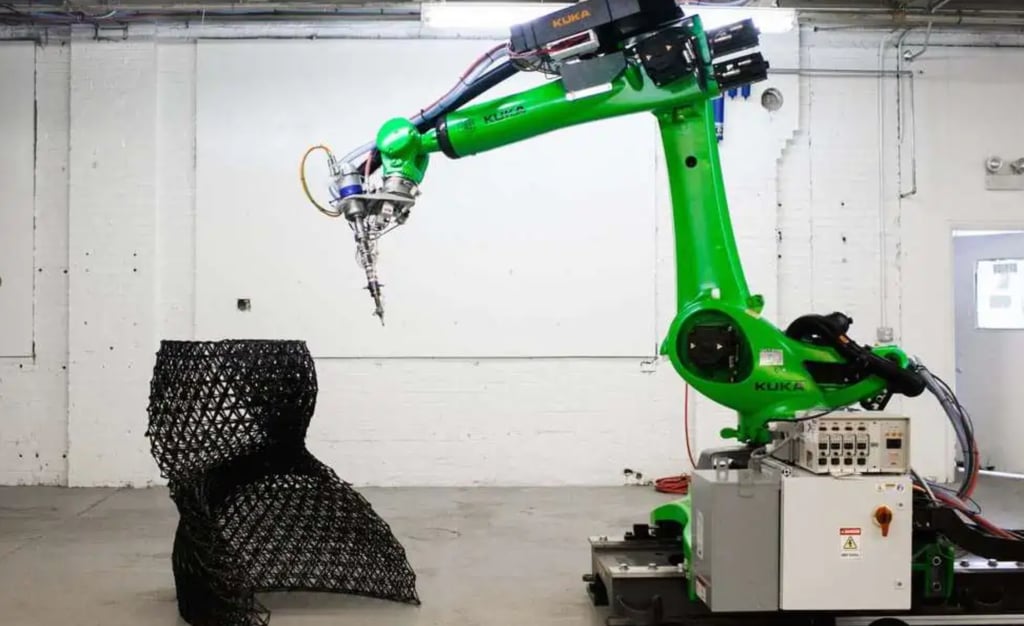
A traditional 3D printer is a box. You put a part inside the box, and the printer builds it layer by layer within the walls of its enclosure. A robotic 3D printer throws away the box. The build volume is whatever the robot can reach, which on a six-axis arm can be several meters in any direction. The global market for robotic 3D printing sat at roughly two billion dollars in 2025 and is projected to reach between three point one and three point five billion by 2030. The fastest growth is in large-format additive manufacturing, driven by construction, aerospace, and automotive industries that need to print parts too big for any conventional machine. A robot does not care whether the part is the size of a shoe or the size of a house. It just moves the print head along the programmed path, depositing material where the software tells it to.
How Robotic 3D Printing Actually Works
Robotic 3D printing works in three main modes. The first and most common is direct printing. A material deposition head is mounted to the robot wrist. The robot moves the head along a precise path while the head extrudes, sprays, or melts material onto the build surface. Layer by layer, the part takes shape. The second mode is auxiliary support. The robot does not print at all. Instead, it loads and unloads build platforms, moves printed parts to finishing stations, removes support structures, and handles packaging. A robot running support operations keeps the printer itself running instead of sitting idle while a human operator clears the last job. The third mode is multi-robot collaborative printing. Two or more robots work on the same part simultaneously, each covering a section of the build. This is how very large structures like building components and ship hull sections get printed in hours instead of days.
What Makes Robotic 3D Printing Different from Traditional 3D Printers
Five things separate a robotic 3D printer from a box-style machine, and they all trace back to the robot having six or seven axes instead of three. The first is non-planar slicing. A traditional printer builds in flat layers stacked vertically. A robot can tilt the print head and deposit material along curved surfaces, following the contour of the part instead of building it like a layer cake. This reduces the need for support structures by more than half in many applications. The second is build volume. A box printer is limited by its enclosure. A robot is limited by its reach and whether it is mounted on a track. Construction robots print structures fourteen meters tall. The third is degrees of freedom. Six axes plus an optional track give the robot the ability to reach around and under features that a three-axis machine would need support material to build. The fourth is startup cost. A robot 3D printing cell does not require a mold or a die. The cost is in the material, the machine time, and the post-processing, not in tooling that has to be amortized over thousands of parts. The fifth is material flexibility. Robotic extruders can handle pellets, which are far cheaper than filament, along with concrete, metal powders, composite fibers, and clay. A single robot platform can switch between materials by changing the print head.
What Materials Can Robotic 3D Printing Handle
The material decides the print head, and the print head decides the robot's payload requirement. Thermoplastics like PLA, ABS, nylon, and PEEK are the most common. They can be fed as filament or as pellets, and pellet-fed systems cost far less per kilogram of material. Concrete and geopolymers drive the construction side of robotic printing. The print head is a nozzle connected to a pump, and the robot needs enough payload to carry the hose and the material inside it. Metals and alloys, including titanium, stainless steel, aluminum, and nickel-based superalloys, are printed using directed energy deposition or powder-fed laser systems. These are the materials of aerospace and energy applications. Composites reinforced with carbon or glass fiber print structural parts that are lighter than metal and stronger than unreinforced plastic. Biomaterials and specialty materials like medical-grade polymers and ceramics show up in implants, tissue scaffolds, and experimental applications. Each material category demands a different print head technology, a different feed system, and a different robot payload. The robot is the motion platform. The material system is what turns motion into parts.
Where Robotic 3D Printing Gets to Work
Aerospace was an early adopter because the parts are large, the volumes are low, and the material costs are high. A robotic printer can lay up a composite wing spar or a titanium engine bracket without the tooling that a traditional forging or machining process demands. Construction is the fastest-growing segment. Concrete-printing robots build walls, columns, and structural elements directly on site or in a prefabrication yard. The economic argument is straightforward: no formwork, less labor, and a build speed that turns a house foundation into a day's work rather than a week's. Automotive uses robotic printing for rapid prototyping, custom fixturing, and lightweight structural parts. The ability to print a prototype bumper or dashboard in hours instead of waiting weeks for a mold changes the development timeline. Marine and energy applications print large structural components, turbine blades, and heat exchangers in materials that are difficult to machine or cast. In large-format additive manufacturing, the lead time compression is dramatic: automotive and aerospace manufacturers report up to eighty percent shorter delivery times after converting to robotic LFAM compared to traditional tooling-dependent processes.
The Cost Side of Robotic 3D Printing
The cost of a robotic 3D printing system is not one number. The robot itself is the motion platform. The print head, the material feed system, the programming software, and the safety guarding are separate line items that add up differently depending on the material and the application. The economics tilt in favor of robotic printing when the part is large, the volume is low, and the alternative is tooling. A mold for a large composite panel can cost more than the entire robotic printing cell that makes the mold unnecessary. Material costs favor pellet-fed systems over filament for any production application. The material cost per kilogram drops significantly, and the print speed increases because pellets melt faster and flow more consistently. The return on investment comes from three directions: eliminating tooling, reducing material waste compared to subtractive processes, and compressing lead times. Seventy-eight percent of manufacturers integrating robots with additive manufacturing report productivity gains, and labor costs in some applications drop by as much as sixty percent compared to manual alternatives. ABB offers a concrete case in point: when the company 3D-printed the fingers for its YuMi collaborative robot, the cost per batch dropped from roughly eighteen hundred euros and a four-week lead time down to three hundred euros and a few hours. That is the kind of math that makes additive manufacturing on a robot arm compelling.
How the Big Four Participate in 3D Printing
The major robot brands are not 3D printer manufacturers. They supply the motion platform, and the 3D printing expertise comes from specialized integrators and print head manufacturers. FANUC robots show up in automotive and aerospace 3D printing cells handling part loading, unloading, and support removal. The M-710iC and R-2000iB series are the most common models in these support roles. ABB is more directly involved in large-format additive manufacturing. The IRB 4400 and IRB 4600 are frequently used as the motion platform for pellet-fed extrusion systems from integrators like CEAD and Caracol. ABB's RobotStudio software can simulate print paths before the robot ever moves, which matters when the part is several meters long and a programming error means hours of wasted material. ABB also uses 3D printing internally for its own robot components. KUKA robots form the backbone of several leading LFAM systems. Integrators like CEAD, Caracol, and Massive Dimension build large-format pellet extrusion heads designed to mount on KUKA and ABB arms. KUKA's KR AGILUS and KR QUANTEC series are the most common platforms in this space. Yaskawa Motoman robots appear in automotive component printing and material deposition applications, often paired with specialized print heads for metal and composite deposition.
What to Know When Buying a Used Robot for 3D Printing
A used robot that will be used for 3D printing needs a different inspection than one destined for palletizing or machine tending. The reason is path accuracy. 3D printing deposits material along a programmed trajectory, and any deviation shows up as a dimensional error in the part. Backlash testing on all six axes is mandatory. A robot that can hold position for a spot weld may still drift on a continuous curved printing path if the servo tuning or reducer wear has degraded its dynamic tracking. The print head and EOAT are the next checkpoint. If the robot comes with a print head already mounted, inspect the nozzle for wear, check the extruder drive gears and the heater element, and confirm that the feed tubes and hoses are not clogged with hardened material. A print head that was put away without being purged can be a solid block of plastic or concrete that requires replacement rather than cleaning. The material handling system needs inspection. Vacuum pumps and pneumatic lines that feed material into the extruder should be checked for leaks and seal integrity. Residual hardened material in feed lines is a common problem on used printing systems. The controller software is the final variable. 3D printing on a robot usually requires non-planar slicing software and a post-processor that converts print paths into robot code. Verify that these software packages are installed, licensed, and transferable. If the robot was used for metal or composite printing, check the controller cabinet for fine conductive dust that can cause intermittent faults. And if the robot handled high-temperature materials like PEEK or metals, inspect the seals and cables near the wrist for heat aging. A robot that spent its life in a printing cell may have low mechanical wear but hidden damage from heat and material residue.
This article was prepared by Tyche Robotic, a supplier of refurbished six-axis industrial robots serving integrators and resellers in Latin America, Southeast Asia, and Europe.


Contact Us
As a professional supplier of used industrial robots, Jiangmen Tyche Robotic Co., Ltd. is committed to providing customers with integrated solutions—from hardware selection and configuration to software programming, debugging, and after‑sales maintenance.
© 2025. All rights reserved.

Mr. Victor Ismael