A Guide to Motoman Robot Controllers: DX200, YRC1000, and What to Check When Buying Used
An overview of Yaskawa Motoman robot controllers covering DX100, DX200, YRC1000, and how they compare to FANUC, ABB, and KUKA controllers. Includes a used Motoman controller inspection checklist.
Tyche Robotic
6/8/20264 min read
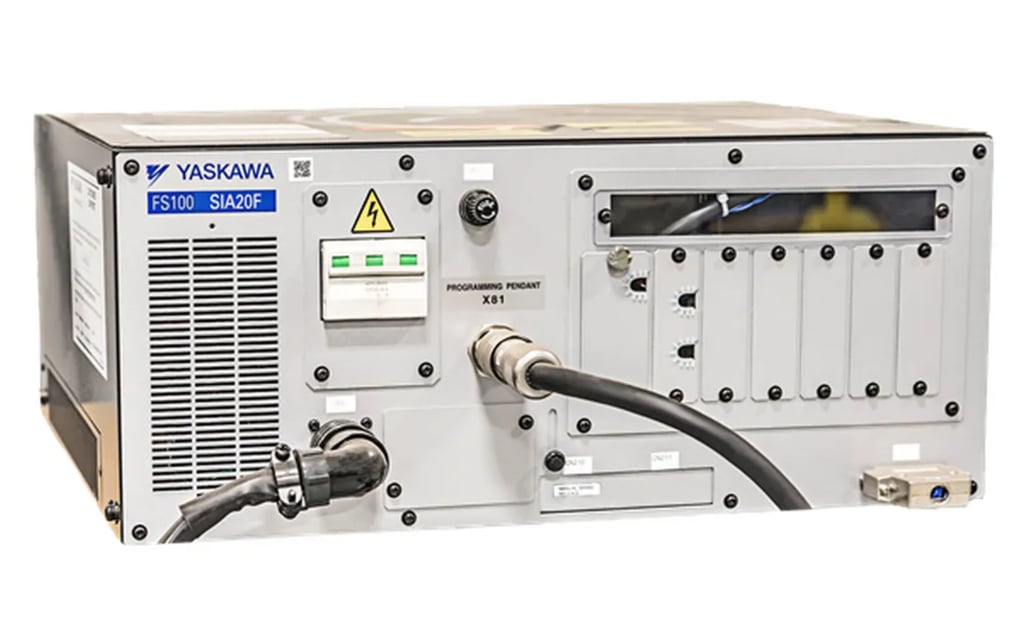
Motoman controllers have followed a clear path over the past two decades. Each generation got smaller, faster, and better at handling multiple robots from a single box. The DX100 was the workhorse of the 2000s. The DX200 took over and is still running in thousands of factories today. The YRC1000 is the current standard, and it is the controller you will find on most newer used Motoman robots. If you are looking at a used Motoman industrial robot, the controller it comes with determines how easily it will integrate, what software features are available, and whether the machine is ready to run or needs work before it can earn its keep.
The Motoman Controller Family: DX100, DX200, YRC1000, and MLX200
The DX100 was the standard controller for Motoman robots through the 2000s. It is a compact unit that handled the MH and MA series robots of that era. It has since been discontinued, but robots with DX100 controllers still show up on the used market. Parts and service knowledge are still available, though the controller lacks the processing speed and communication options of the later generations. The DX200 is the bridge to the modern era. It is still widely deployed and pairs with the later MH and MA series robots that are common on the used market. It added faster processing, better I/O options, and support for more advanced software features. A used Motoman robot controller from the DX200 generation is a known quantity. Integrators understand it, parts are available, and the software ecosystem is mature.
The YRC1000 is the current flagship. It is an ultra-compact unit, one hundred twenty-five liters in volume and seventy kilograms in weight, that handles up to eight robots and seventy-two axes of synchronized motion from a single controller, with sixteen concurrent tasks and thirty-two control groups. That multi-robot capability is what sets the YRC1000 apart from most other controllers on the market. It is also fast, with I/O throughput that is significantly quicker than the DX200. The YRC1000 pairs with the GP and AR series robots and is the controller to look for on a used Motoman if you want the latest capabilities at a used price. The YRC1000micro is an even smaller version for compact robots. The MLX200 is a separate line built for collaborative applications and pairs with Motoman's HC series cobots.
How Motoman Controllers Compare to the Other Big Four
Every robot brand builds its controller around a different idea, and the differences show up in how the machines are integrated and maintained. The Motoman controller comparison to the rest of the Big Four is instructive. Motoman's YRC1000 is built around multi-robot coordination. The ability to run up to eight robots from one box is not a minor feature. It is the core design philosophy, and it is why fabricators with complex welding cells often standardize on Motoman. FANUC's R-30iB is a closed, stable system that prioritizes reliability over flexibility. It runs the same way for years, and iRVision integrates directly without a separate PC. ABB's IRC5 and OmniCore are built around motion control. TrueMove and QuickMove deliver path accuracy and cycle time optimization, and SafeMove2 adds safety-rated motion control. KUKA's KRC4 and KRC5 run on a Windows-based open architecture, which gives integrators more freedom to customize but requires the same IT maintenance as any industrial PC. The Yaskawa vs FANUC controller comparison often comes down to whether the buyer needs multi-robot coordination, where Yaskawa leads, or prefers the closed stability and larger installed base that FANUC offers.
What to Check When Buying a Used Motoman Controller
Buying a used Yaskawa robot means inspecting the controller as closely as the arm. The battery is the first thing to check. Every Motoman controller uses batteries to hold the mastering data that tells the robot where each axis is. When those batteries die, the mastering is lost, and re-mastering a six-axis robot costs time and money. A controller with a recent battery replacement is worth more than one still running on aging originals. The software licenses are next. MotoWeld for welding and MotoSight for vision guidance are licensed features. They are not automatically included, and they are not automatically transferable. Verify what is installed, confirm the licenses are active, and make sure they can be transferred to a new owner. A pre-owned Motoman welding robot without its welding software is just a handling robot with a torch bolted to it. The physical condition of the cabinet matters. Open the door and look for dust or moisture. Fine metallic dust is conductive and causes intermittent faults. Check that the cooling fans spin freely and the heat sinks are clear. If the controller came from a multi-robot cell, the coordination files and external axis parameters need to be saved and transferable. Rebuilding a synchronized multi-robot setup from scratch is a significant engineering effort. Finally, power up the controller and watch the boot sequence. Persistent error codes during startup should be investigated, not ignored. The teach pendant screen should be clear and responsive. A controller that boots cleanly is the minimum standard before buying.
This article was prepared by Tyche Robotic, a supplier of refurbished six-axis industrial robots serving integrators and resellers in Latin America, Southeast Asia, and Europe.
Contact Us
As a professional supplier of used industrial robots, Jiangmen Tyche Robotic Co., Ltd. is committed to providing customers with integrated solutions—from hardware selection and configuration to software programming, debugging, and after‑sales maintenance.
© 2025. All rights reserved.

Mr. Victor Ismael